Chef Start here with ease..


Introduction

Until I discovered cooking, I was never really interested in anything. Julia Child

Chef, the lead in automation industry has many tickling facet and calibre. Before introducing the potentials of “The Chef”, it’s non negotiable to evade the foresight of its relevance to devops exercises. Chef can take care of server automation, infrastructure environment and continuously deliver your application.


Motive behind this array

With this blog series, we will familiarize you with the concepts of chef and will try to make you comfortable with our hands on blogs. This series of blog contains 15 blogs in a row which will enhance the knowledge and draw your faith in chef.

Always Pre-Heat The Oven Before Putting The Meat In !!

Prerequisites

For all the upcoming blogs we presume that you have basic understanding of Git, Docker,Vagrant and Linux. This blog series is written in consideration with centos as platform, although you can apply them on ubuntu by following some minor changes.


We are going to use our public git repository for all the blogs in this series. We will be using centos7 vagrant box to spin up our testing environment.


We are going to follow a single problem statement in our all blogs to maintain the uniformity and avoid the ambiguity. We are going to install nginx using chef and deploying two virtual host (blog.opstree.com, chef.opstree.com) with it.


Blogs in this series

In this blog we describe Nginx and manually setup the nginx, as per the problem statement and also create two virtual host(blog.opstree.com, chef.opstree.com).

Here we took some example of resources such as package, git, file and service and put our hands to work with chef-apply. We perform some simple task using chef resources.

This blog provides you theoretical concepts about chef resources. In this article  resources and their attributes elaborated.

Chef recipes is in consideration for this edition. Create your first recipe and apply it with chef. Complete doctrine behind the recipes of chef with simplified examples.

Walls of chef house, the cookbook, written from scratch with step to step explanation. Setup of nginx and proxy implementation with sample cookbook.

This blog furnish entire theoretical stuff about cookbooks. This includes command line cookbook generation and handling. One by one description of complete directory structure of a cookbook.  

Installation of chef kitchen. Testing of our nginx cookbook in different environment using docker container. Create, converge, verify and destroy a node with kitchen.

  1. Chef-Kitchen Chefs diagnosis center..
Theory behind the chef kitchen. Complete cycle of kitchen. With in this article elaborated view of .kitchen.yml file, and .kitchen folder provided.

  1. Chef Foodcritic && Chef Rubocop Handle it casually..
Chef lint tools, foodcritic and rubocop requirement. Theory, setup and practice exercises for foodcritic and rubocop.  

  1. Chef-Databags Carry all at once..
Introduction to databags and their need. Division of code and data with databags.  Databags implementation with chef-solo. Setup of mysql password with databags.  

  1. Chef-Roles Club everybody..
Requirement and implementation of chef roles. Clubbing of multiple nodes with chef roles. Complete web stack (webserver, proxy server and database) setup with roles.

  1. Chef-Environment  Organized wisely..
Chef environments for better management of the need of an organization. A complete organizational view with chef to setup different environment. Handle environments with chef-knife.

  1. Chef Server-Client Setup
Complete setup of chef client-server mode. Use of vagrant provisioning only, to spin up chef-server, chef-client and workstation.

  1. Collaboration of Client Server and Workstations
How chef-server, client and workstations work together to automate a complete infrastructure. Chef-server web interface.

  1. Chef Server-Client Work quietly..
Kickoff working with workstation. Chef-client. Install nginx and setup proxies with nginx cookbook on client node.

jgit-flow maven plugin to Release Java Application

Introduction

As a DevOps I need a smooth way to release the java application, so I compared two maven plugin that are used to release the java application and in the end I found that Jgit-flow plugin is far better than maven-release plugin on the basis of following points:
  • Maven-release plugin creates .backup and release.properties files to your working directory which can be committed mistakenly, when they should not be. jgit-flow maven plugin doesn’t create these files or any other file in your working directory.
  • Maven-release plugin create two tags.
  • Maven-release plugin does a build in the prepare goal and a build in the perform goal causing tests to run 2 times but jgit-flow maven plugin builds project once so tests run only once.
  • If something goes wrong during the maven plugin execution, It become very tough to roll it back, on the other hand jgit-flow maven plugin makes all changes into the branch and if you want to roll back just delete that branch.
  • jgit-flow maven plugin doesn’t run site-deploy
  • jgit-flow maven plugin provides option to turn on/off maven deployment
  • jgit-flow maven plugin provides option to turn on/off remote pushes/tagging
  • jgit-flow maven plugin keeps the master branch always at latest release version.
Now let’s see how to integrate Jgit-flow maven plugin and use it

    How to use Jgit-flow maven Plugin for Release

    Follow the flowing steps 
    1. Add the following lines in your pom.xml for source code management access
             

        scm:git:
        scm:git:git:


    2. Add these line to resolve the Jgit-flow maven plugin and put the other option that will be required during the build


              com.atlassian.maven.plugins
              maven-jgitflow-plugin
              1.0-m4.3
             
                true
               false
      true
                true
                true
      true
      true
      true
               
                  master-test
                  deploy-test


    3. Above code snippet will perform following steps:

      • Maven will resolve the jgitflow plug-in dependency
      • In the configuration section, we describe how jgit-flow plug-in will behave.
      • pushRelease XML tag to enable and disable jgit-flow from releasing the intermediate branches into the git or not.
      • keepBranch XML tag to enable and disable the plug-in for keep the intermediate branch or not.
      • noTag XMl tag to enable and disable the plug-in to create the that tag in git.
      • allowUntracked XML tag to whether allow untracked file during the checking. 
      • flowInitContext XML tag is used to override the default and branch name of the jgit-flow plug-in
      • In above code snippet, there is only two branches, master from where that code will be pulled and a intermediate branch that will be used by the jgit-flow plug-in. as I have discussed that jgit-flow plug-in uses the branches to keep it records. so development branch will be created by the plug-in that resides in the local not remotely, to track the release version etc. 
    4. To put your your releases into the repository manager add these lines


    5. Put the following lines into your m2/settings.xml with your repository manager credentials


    Start Release jgit-flow maven plugin command

    To start the new release execute jgitflow:release-start.  

    Finish Release jgit-flow maven plugin  command

    To finish new release, execute mvn jgitflow:release-finish.

    For a example I have created a repository in github.com. for testing and two branch master-test and deploy-test. It is assumed that you have configured maven and git your system.
    In the deploy-test branch run following command
    $ mvn clean -Dmaven.test.skip=true install jgitflow:release-start

    This command will take input from you for release version and create a release branch with release/. then it will push this release branch into github repository for temporarily because we are not saving the intermediate branched

    Now At the end run this command
    $ mvn -Dmaven.test.skip=true jgitflow:release-finish
    after finishing this command it will delete release/ from local and remote.

    Now you can check the changes in pom file by jgitflow. in the above snapshot, it is master-test branch, you can see in the tag it has removed the snapshot and also increased the version.  It hold the current version of the application.

    And in the deploy-test branch it show you new branch on which developers are working on

    2015 – What an exciting year has gone by


    OpsTree 2015 Journey

    2015 – What an exciting year has gone by. We have had all the fun we could have asked for. We learnt, grew, built relationships, earned valuable trust and we did all these because we are driven by our core values of honesty, transparency and assiduousness. At the onset of the new year, we would like to thank all our partners who laid their valuable faith on us and helped us do our bit in their success stories. Read on to know all about 2015 at OpsTree.

    We built great partnerships

    2015 at Opstree was a year filled with excitement and challenges and success. The team grew and we shifted to a great new office, but most importantly we built great partnerships. The team worked towards achieving the agreed goals with the intention to go beyond the expectation of our partners at each step. Our relations with our partners stand testimony to this. 


    We multiplied productivity by learning

    We grew qualitatively by deciding to invest heavily in learning. We dedicate one full day per week towards self-development and learning. The results of our learning is evident through the thought leadership initiatives like our blogs, github contributions and open source contributions. But for us, what is more valuable than thought leadership is the significant improvement in the knowledge pool of the company. Today our resources are at least 2x more productive, because of their commitment to learning. 

    We matured as Devops Company

    We found that there three types of requirements in the market and we aligned our offering along that line. We divided our company into three verticals

    1. End to End devops management – This vertical works closely with Product companies typically startup/midsize companies. OpsTree manages the complete dev/tech ops of such companies which allows our partners to focus on their core function while they still have state of the art infra setup and happy end users.

    2. Work with big players – This vertical works with large service companies in team augmentation/back to back devops contract mode. This enables OpsTree to create an impact on bigger players through our esteemed partners.

    3. Devops Solutioning –This team consists of devops architects who are passionate about devops. Architectural decisions, development of libraries, solutioning and conducting trainings is what drives them. 

    Worked with some prestigious Logos

    Some of our key outcomes for the last year have been the end to end management of DevOps operations of certain well established product companies. It is through their recommendations and references that we are growing at this fast pace. All our client relations have been partnerships where we have grown together to help each other deliver the best. Our expanding team is filled with enthusiastic people who are always looking for their next challenge. 

    We Guarantee improved Productivity

    At the core of everything we do are our core values of giving our best to every project and trying every possible method to get the most optimized outcome. Giving our partners a “wow” experience is what we aim for. 

    Welcome 2016

    It is well researched and accepted fact – ‘Devops helps companies deliver more’. Gartner says by 2016 DevOps will evolve from a niche to a mainstream strategy employed by 25% of the Global 2000 organizations. We are ready for this exciting new tomorrow. Are you? 

    The Reset Button !!!!

    !!!! The Reset button !!!!

    Anyone who has recently used the Google Compute Engine for creating the VM instances will be aware of the reset button available.

    Since I wasn’t very much sure of it , I just clicked it without much know-how . This resulted in making all the servers to their original state as they were freshly build and which is certainly a very bad thing for us.

    But , we had  puppet that we used to create the whole infrastructure as it is . All the modules we had used and changes we made were committed to GitHub repo and this certainly was a boon to us, else we have to sit whole day long for making those changes on the servers.

    Just in couple of minutes the new  instances were created using the compute engine-create group instance feature. We did  installation of the foreman  and git on one of the servers and set up the  puppet clients agents accordingly . This took around 15 more crucial minutes and then cloned our GitHub repo which contains all the  necessary modules and configurations required for the rest of infrastructure.

    These are the conditions where Configuration Management Tools like Puppet come in picture and help us get on the track in the shortest possible manner.
    It was a hectic day but definitely made us learn several important aspects. Using puppet for maintain the infrastructure is really important now days. It is reliable,efficient and fast for deploying configurations on the servers  and making ready for the production work load.

    Setup Jenkins using Ansible

    In this document I’ll walk you through how you can  setup jenkins using ansible.

    Prerequisites
    •  OS – Ubuntu {at least two machine required in production}
    •  First machine for Ansible  installation
    •  Second machine where we will install jenkins server
    • You should have basic understanding of ansible workflow.
    Note :  You should have password less login enabled in second machine. use this link 
    http://www.linuxproblem.org/art_9.html

    Ansible Installation
    Before starting with installing jenkins using ansible, you need to have ansible installed in your system.

     $ curl https://raw.githubusercontent.com/OpsTree/AnsiblePOC/alok/scripts/Setup/setup_ansible.sh | sudo bash

    Setup jenkins using Ansible

    Install jenkins ansible roles

    Once we have ansible installed in our system, we can start installing the jenkins using ansible. To install we will use an already available ansible role to setup jenkins

    $ ansible-galaxy install geerlingguy.jenkins
    to know more about the jenkins role hit this link https://galaxy.ansible.com/detail#/role/440

    Ansible roles default directory path is /etc/ansible/roles
    Make ansible playbook file
     

    Now the next step is to use the installed jenkins roles to install the jenkins. For this purpose we will create a playbook  and hosts file with below content

    $ cd ~/MyPlaybook/jenkins
    create a file hosts and add below content
    [jenkins_hosts]
    192.168.33.15

    Screenshot from 2015-11-30 12:55:41.png

    Next create  a file site.yml and add below content
    – hosts: jenkins_hosts
     roles:
         – { role: geerlingguy.jenkins }

    Screenshot from 2015-11-30 12:59:08.png

    so configuration file is done, the next step is to run ansible playbook command

    $ ansible-playbook -i hosts site.yml

    Now that Jenkins is running, go to http://192.168.33.15:8080. You’ll be welcome by the default Jenkins screen.

    Opstree SHOA Part 1: Build & Release

    p { margin-bottom: 0.25cm; line-height: 120%; }

    At Opstree we have started a new initiative called SHOA, Saturday Hands On Activity. Under this program we pick up a concept, tool or technology and do a hands on activity. At the end of the day whatever we do is followed by a blog or series of blog that we have understood during the day.
    Since this is the first Hands On Activity so we are starting with Build & Release


    What we intend to do 


    Setup Build & Release for project under git repository https://github.com/OpsTree/ContinuousIntegration.

    What all we will be doing to achieve it

    • Finalize a SCM tool that we are going to use puppet/chef/ansible.
    • Automated setup of Jenkins using SCM tool.
    • Automated setup of Nexus/Artifactory/Archiva using SCM tool.
    • Automated setup of Sonar using SCM tool.
    • Dev Environment setup using SCM tool: Since this is a web app project so our Devw443 environment will have Nginx & tomcat.
    • QA Environment setup using SCM tool: Since this is a web app project so our QA environment will have Nginx & tomcat.
    • Creation of various build jobs
      • Code Stability Job.
      • Code Quality Job.
      • Code Coverage Job.
      • Functional Test Job on dev environment.
    • Creation of release Job.
    • Creation of deployment job to do deployment on Dev & QA environment.
    This activity is open for public as well so if you have any suggestion or you want to attend it you are most welcome

    Marrying Nginx with ELB

    Few weeks back I got a requirement to setup a highly available API server. I said not a big deal! I’ll have Nginx as a reverse proxy(Why not directly exposing API via ELB a different story) and my API auto scaled setup will sit behind an internal ELB and things would be in place TA DA.

    Things worked perfectly fine for few days, but one day the API consumer reported that they are not getting response back, what? When I checked the API url was indeed returning a 502 error code. It was really strange for nginx to be sending 502 response back that meant the highly scalable setup was down? Well I was proven wrong ELB was working perfectly fine as the curl request to internal ELB was returning proper response, so yes the highly available API setup was in place. What next, yes! Nginx error logs. I did saw Nginx reporting connection timeout with 502 error code. The interesting thing to note that it was an IP(random IP assigned to ELB), when I tried to do curl hit on that IP for API request, it did failed EUREKA EUREKA!! I reproduced the problem.

    Well now I’ve to collect all this information and infer what is the logical cause of the problem, and yes there are lot of smart people available who would have fond the solution to this problem so I’ve to ask right question in Google :). The question was “Nginx using Ip instead of domain name” and the answer was “Nginx caches the IP at the startup and obviously as ELB is Elastic in nature so it’s IP changes over the period of time”. That was the reason Nginx was trying to talk to the older un-associated IP’s of Internal ELB.

    Finding solution was not a big task as it was just about making sure  Nginx should talk to ELB not the IP’s associated with it, that’s why said marrying nginx with ELB :).

    I’ll not go into the actual solution as there are already solutions available in web. I referred this really good blog as a solution.

    http://ghost.thekindof.me/nginx-aws-elb-dns-resolution-nginx-resolver-directive-and-black-magic/

    PERCONA STANDALONE SERVER

    As a DevOps activist I am exploring Percona XtraDB. In a series of blogs I will share my learnings. This blog intends to capture step by step details of installation of Percona XtraDB in Standalone mode


    Introduction:


    Percona Server is an enhanced drop-in replacement for Mysql. It offers breakthrough performance, scalability, features, and instrumentation.
    Percona focus on providing a solution for the most demanding applications, empowering users to get the best performance and lowest downtime possible.

    The Percona XtraDB Storage Engine:

    • Percona XtraDB is an enhanced version of the InnoDB storage engine, designed to better scale on modern hardware, and including a variety of other features useful in high performance environments. It is fully backwards compatible, and so can be used as a drop-in replacement for standard InnoDB. 
    • Percona XtraDB includes all of InnoDB’s robust, reliable ACID-compliant design and advanced MVCC architecture, and builds on that solid foundation with more features, more tunability. more metrics, and more scalability.
    • It is designed to scale better on many cores, to use memory more efficiently, and to be more convenient and useful.

        Installation on ubuntu:

        STEP 1: Add Percona Software Repositories
        $ apt-key adv --keyserver keys.gnupg.net --recv-keys 1C4CBDCDCD2EFD2A
        STEP 2: Add this to /etc/apt/sources.list:
        deb http://repo.percona.com/apt precise main
        deb-src http://repo.percona.com/apt precise main
        STEP 3: Update the local cache
        $ apt-get update
        STEP 4: Install the server and client packages
        $ apt-get install percona-server-server-5.6 percona-server-client-5.6

        STEP 5: Start Percona Server

        $ service mysql start

        Let me know if you have any suggestions. You can also contact me at belwal.mohit@gmail.com.

        Understanding Percona XtraDB cluster

        As a DevOps activist I am exploring Percona XtraDB. In a series of blogs I will share my learnings. This blog intends to capture theoretical knowledge of Percona XtraDB Cluster.

        Prerequisites

        1. You should have basic knowledge of mysql. 
        2. OS – Ubuntu

        What is Percona?

        Percona XtraDB cluster is an open source, free MySql high availability and scalability software.
        It provides:
        1. Synchronous Replication: Transaction either committed on all nodes or none.
        2. Multi-Master Replication: You can write to any node
        3. Parallel applying events on slave. Real “parallel replication”.
        4. Automatic node provisioning.
        5. Data consistency. No more unsynchronized slaves.

        Introduction

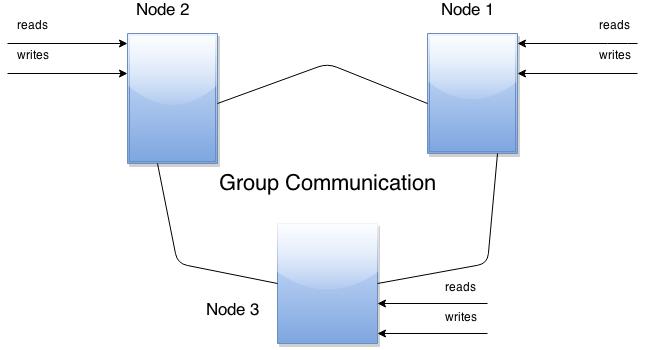
        1. The cluster consists of nodes. The cluster’s recommended configuration is to have 3 nodes, however 2 nodes can be used as well.
        2. Every node is a regular Mysql / Percona server setup. You can convert your existing MySQL / Percona Server into Node and roll Cluster using it as a base or you can detach Node from Cluster and use it as a regular server.
        3. Each node will contain full copy of data.

        percona.jpeg.jpg

        Benefits of this approach:

        • Whenever you execute a query, it is executed locally. All data is available locally, so no remote access is required.
        • No central management. You can loose any node at any time, and cluster will continue functioning.
        • It is a good solution for scaling read workload. You can put read queries to any of the nodes.

        Drawbacks:

        • Overhead of joining new node. New node will copy all data from an existing node. If it is 100 GB, it will copy 100 GB.
        • Not an effective write scaling solution. All writes have to go on all nodes.
        • Duplication of data. If you have 3 nodes, there will be 3 duplicates.

        Difference between Percona XtraDB Cluster and MySQL Replication

        For this we will have to look into the well known CAP theorem for distributed systems. According to this theorem, characteristics of Distributed systems are:
        C – Consistency (all your data is consistent on all nodes),
        A – Availability (your system is AVAILABLE to handle requests in case of failure of one or several nodes),
        P – Partitioning tolerance (in case of inter-node connection failure, each node is still available to handle requests).
        CAP theorem says that any Distributed system can have any two out of these three.
        • MySQL replication has: Availability and Partitioning tolerance.
        • Percona XtraDB Cluster has: Consistency and Availability.
        So, MySql replication does not guarantee Consistency of data, while Percona XtraDB cluster provides consistency while it looses partitioning tolerance.

        Components 

        Percona XtraDb Cluster is based on:
        • Percona Server with XtraDB and includes Write Set Replication patches.
        It uses:
        • Galera Library: A generic synchronous Multi-Master replication plugin for transactional applications.
        • Galera supports:
          • Incremental State Transfer (IST), useful in WAN deployments.
          • RSU, Rolling Schema Update. Schema change does not block operations against table.

        Percona XtraDB cluster limitations

        • Currently replication work only with InnoDB storage engine.
        That means writes to table of other types, including (mysql.*) tables, are not replicated.
        DDL statements are replicated in statement level and changes to mysql.* tables will get replicated that way.
        So you can issue: CREATE USER …. , this will be replicated,
        but issuing: INSERT INTO mysql.user …. , will not be replicated.
        You can also enable experimental MyISAM replication support with wsrep_replicate_myisam.
        • Unsupported queries:
          • LOCK/UNLOCK tables
          • lock function (GET_LOCK(), RELEASE_LOCK()….)
        • Due to cluster level concurrency control, transaction issuing COMMIT may be aborted at that stage.
        There can be two transactions writing to same rows and committing in separate Percona XtraDB Cluster nodes, and only one of the them can successfully commit. The failing one will be aborted. For cluster level aborts, Percona will give back deadlock error code.
        • The write throughput of whole cluster is limited by weakest node. If one node becomes slow, whole cluster will become slow.

        FEATURES


        High Availability

        In a basic setup with 3 nodes, the Percona XtraDB cluster will continue to function if you take any of the nodes down. Even in a situation of node crash, or if node becomes unavailable over network, the cluster will continue to work, and queries can be issued on working nodes.
        In case, when there are changes in data while node was down, there are two options that Node may use when it joins the cluster:
        1. State Snapshot Transfer (SST): SST method performs full copy of data from one node to other. It’s used when a new node joins the cluster. One of the existing node will transfer data to it.
           There are three available methods of SST:
          • mysqldump
          • rsync
          • xtrabackup
        Downside of “mysqldump” and “rsync” is that your cluster becomes READ-ONLY while data is copied from one node to other.
        while
        xtrabackup SST does not require this for entire syncing process.
        1. Incremental State Transfer (IST): If a node is down for a short period of time, and then starts up, the node is able to fetch only those changes made during the period it was down.
        This is done using caching mechanism on nodes. Each node contains a cache, ring-buffer of last N changes, and the node is able to transfer part of this cache. IST can be done only if the amount of changes needed to transfer is less than N. If it exceeds N, then the joining node has to perform SST.


        Multi-Master Replication

        • Multi-Master replication stands for the ability to write to any node in the cluster, and not to worry that it will get out-of-sync situation, as it regularly happens with regular MySQL replication if you imprudently write to the wrong server.
        • With Percona XtraDB Cluster you can write to any node, and the Cluster guarantees consistency of writes. That is, the write is either committed on all the nodes or not committed at all.
        All queries are executed locally on the node, and there is a special handling only on COMMIT. When the COMMIT is issued, the transaction has to pass certification on all the nodes. If it does not pass, you will receive ERROR as a response on that query. After that, transaction is applied on the local node.

        Let me know if you have any suggestions. You can also contact me at belwal.mohit@gmail.com.

        Getting Started with Percona XtraDB Cluster

        Percona XtraDB Cluster

        As a DevOps activist I am exploring Percona XtraDB. In a series of blogs I will share my learnings. This blog intends to capture step by step details of installation of Percona XtraDB in Cluster mode. 

        Why Cluster Mode Introduction:

        Percona XtraDB cluster is High Availability and Scalability solution for MySQL users which provides
                  Synchronous replication : Transaction either committed on all nodes or none.
                  Multi-master replication : You can write to any node.
                  Parallel applying events on slave : parallel event application on all slave nodes
                  Automatic node provisioning
                  Data consistency

          Straight into the Act:Installing Percona XtraDB Cluster

          Pre-requisites/Assumptions
          1. OS – Ububtu
          2. 3 Ubuntu nodes are available
          For the sake of this discussion lets name the nodes as
          node 1
          hostname:
          percona_xtradb_cluster1
          IP: 192.168.1.2

          node 2
          hostname: percona_xtradb_cluster2
          IP: 192.168.1.3

          node 3
          hostname: percona_xtradb_cluster3
          IP: 192.168.1.4

          Repeat the below steps on all nodes

          STEP 1 : Add the Percona repository

          $ echo "deb http://repo.percona.com/apt precise main" >> /etc/apt/sources.list.d/percona.list
          $ echo "deb-src http://repo.percona.com/apt precise main" >> /etc/apt/sources.list.d/percona.list
          $ apt-key adv --keyserver keys.gnupg.net --recv-keys 1C4CBDCDCD2EFD2A
          STEP 2 : After adding percona repository, Update apt cache so that new packages can be included in our apt-cache.
          $ apt-get update

          STEP 3 : Install Percona XtraDB Cluster :

          $ apt-get install -y percona-xtradb-cluster-56 qpress xtrabackup

          STEP 4 : Install additional package for editing files, downloading etc :

          $ apt-get install -y python-software-properties vim wget curl netcat

          With the above steps we have, installed Percona XtraDB Cluster on every node. Now we’ll configure each node, so that a cluster of three nodes can be formed.

          Node Configuration:

          Add/Modify file /etc/mysql/my.cnf on first node :

          [MYSQLD] #This section is for mysql configuration
          user = mysql
          default_storage_engine = InnoDB
          basedir = /usr
          datadir = /var/lib/mysql
          socket = /var/run/mysqld/mysqld.sock
          port = 3306
          innodb_autoinc_lock_mode = 2
          log_queries_not_using_indexes = 1
          max_allowed_packet = 128M
          binlog_format = ROW
          wsrep_provider = /usr/lib/libgalera_smm.so
          wsrep_node_address = 192.168.1.2
          wsrep_cluster_name="newcluster"
          wsrep_cluster_address = gcomm://192.168.1.2,192.168.1.3,192.168.1.4
          wsrep_node_name = cluster1
          wsrep_slave_threads = 4
          wsrep_sst_method = xtrabackup-v2
          wsrep_sst_auth = sst:secret

          [sst] #This section is for sst(state snapshot transfer) configuration
          streamfmt = xbstream

          [xtrabackup] #This section is defines tuning configuration for xtrabackup
          compress
          compact
          parallel = 2
          compress_threads = 2
          rebuild_threads = 2

          Note :
                   wsrep_node_address = {IP of current node}
                   wsrep_cluster_name= {Name of cluster}
                   wsrep_cluster_address = gcomm://{Comma separated IP address’s which are in cluster}
                   wsrep_node_name = {This is name of current node which is used to identify it in cluster}

          Now as we have done node configuration. Now start first node services:
          Start the node :

          $ service mysql bootstrap-pxc

          Make sst user for authentication of cluster nodes :

          $ mysql -e "GRANT RELOAD, LOCK TABLES, REPLICATION CLIENT ON *.* TO 'sst'@'localhost' IDENTIFIED BY 'secret';"

          Check cluster status :

          $ mysql -e "show global status like 'wsrep%';"

          Configuration file for second node:

          [MYSQLD]
          user = mysql
          default_storage_engine = InnoDB
          basedir = /usr
          datadir = /var/lib/mysql
          socket = /var/run/mysqld/mysqld.sock
          port = 3306
          innodb_autoinc_lock_mode = 2
          log_queries_not_using_indexes = 1
          max_allowed_packet = 128M
          binlog_format = ROW
          wsrep_provider = /usr/lib/libgalera_smm.so
          wsrep_node_address = 192.168.1.3
          wsrep_cluster_name="newcluster"
          wsrep_cluster_address = gcomm://192.168.1.2,192.168.1.3,192.168.1.4
          wsrep_node_name = cluster2
          wsrep_slave_threads = 4
          wsrep_sst_method = xtrabackup-v2
          wsrep_sst_auth = sst:secret

          [sst]
          streamfmt = xbstream

          [xtrabackup]
          compress
          compact
          parallel = 2

          After doing configuration, start services of node 2.
          Start node 2 :

          $ service mysql start

          Check cluster status :

          $ mysql -e "show global status like 'wsrep%';"

          Now similarly you have to configure node 3. Changes are listed below.

          Changes in configuration for node 3 :
          wsrep_node_address = 192.168.1.4

          wsrep_node_name = cluster3

          Start node 3 :

          $ service mysql start

          Test percona XtraDb cluster:

          Log-in by mysql client in any node:

          <code prettyprint="" style="color: black; word-wrap: no 
          mysql>create database opstree;
          mysql>use opstree;
          mysql>create table nu113r(name varchar(50));
          mysql>insert into nu113r values("zukin");
          mysql>select * from nu113r;

          Check the database on other node by mysql client:

          mysql>show databases;

          Note : There should be a database named “opstree”.

          mysql>use opstree;
          mysql>select * from nu113r; 

          Note : Data will be same as in the previous node.

          Let me know if you have any suggestions. You can also contact me at belwal.mohit@gmail.com.

          Design a site like this with WordPress.com
          Get started